SQL Cheatsheet
Table Of Contents
- SQL Cheatsheet
Commands
Manipulation
How to use SQL to access, create, and update data stored in a database.
CREATE TABLE
CREATE TABLE table_name (
  column_1 datatype,
  column_2 datatype,
  column_3 datatype
);
CREATE TABLE creates a new table in the database. It allows you to specify the name of the table and the name of each column in the table.
Example:
CREATE TABLE Orders (
  OrderID int NOT NULL,
  OrderNumber int NOT NULL,
  PersonID int,
  PRIMARY KEY (OrderID),
  FOREIGN KEY (PersonID) REFERENCES Persons(PersonID)
);
INSERT
INSERT VALUES
INSERT INTO table_name (column_1, column_2, column_3)
VALUES (value_1, value_2, value_3);
INSERT statements are used to add a new row to a table.
INSERT SELECT
INSERT INTO table2
SELECT * FROM table1
WHERE condition;
DELETE
DELETE FROM table_name
WHERE some_column = some_value;
DELETE statements are used to remove rows from a table.
UPDATE
UPDATE table_name
SET some_column = some_value
WHERE some_column = some_value;
UPDATE statements allow you to edit rows in a table.
SELECT
SELECT column_name
FROM table_name;
SELECT statements are used to fetch data from a database. Every query will begin with SELECT.
ALTER TABLE
Add Column
ALTER TABLE table_name
ADD column_name datatype;
Delete(Drop) Column
ALTER TABLE table_name
DROP COLUMN column_name;
Modify Datatype
ALTER TABLE table_name
MODIFY COLUMN column_name datatype;
WHERE Clause
SELECT column_name(s)
FROM table_name
WHERE column_name operator value;
WHERE is a clause that indicates you want to filter the result set to include only rows where the following condition is true.
Operators
AND
SELECT column_name(s)
FROM table_name
WHERE column_1 = value_1
  AND column_2 = value_2;
AND is an operator that combines two conditions. Both conditions must be true for the row to be included in the result set.
BETWEEN
SELECT column_name(s)
FROM table_name
WHERE column_name BETWEEN value_1 AND value_2;
The BETWEEN operator is used to filter the result set within a certain range. The values can be numbers, text or dates.
IS NULL / IS NOT NULL
SELECT column_name(s)
FROM table_name
WHERE column_name IS NULL;
IS NULL and IS NOT NULL are operators used with the WHERE clause to test for empty values.
LIKE
SELECT column_name(s)
FROM table_name
WHERE column_name LIKE pattern;
LIKE is a special operator used with the WHERE clause to search for a specific pattern in a column.
%: Wildcard_: Any single character
OR
SELECT column_name
FROM table_name
WHERE column_name = value_1
   OR column_name = value_2;
OR is an operator that filters the result set to only include rows where either condition is true.
Aggregate Functions
AVG()
SELECT AVG(column_name)
FROM table_name;
AVG() is an aggregate function that returns the average value for a numeric column.
COUNT()
SELECT COUNT(column_name)
FROM table_name;
COUNT() is a function that takes the name of a column as an argument and counts the number of rows where the column is not NULL.
MAX()
SELECT MAX(column_name)
FROM table_name;
MAX() is a function that takes the name of a column as an argument and returns the largest value in that column.
MIN()
SELECT MIN(column_name)
FROM table_name;
MIN() is a function that takes the name of a column as an argument and returns the smallest value in that column.
SUM()
SELECT SUM(column_name)
FROM table_name;
SUM() is a function that takes the name of a column as an argument and returns the sum of all the values in that column.
ROUND()
SELECT ROUND(column_name, integer)
FROM table_name;
ROUND() is a function that takes a column name and an integer as arguments. It rounds the values in the column to the number of decimal places specified by the integer.
Multiple Tables
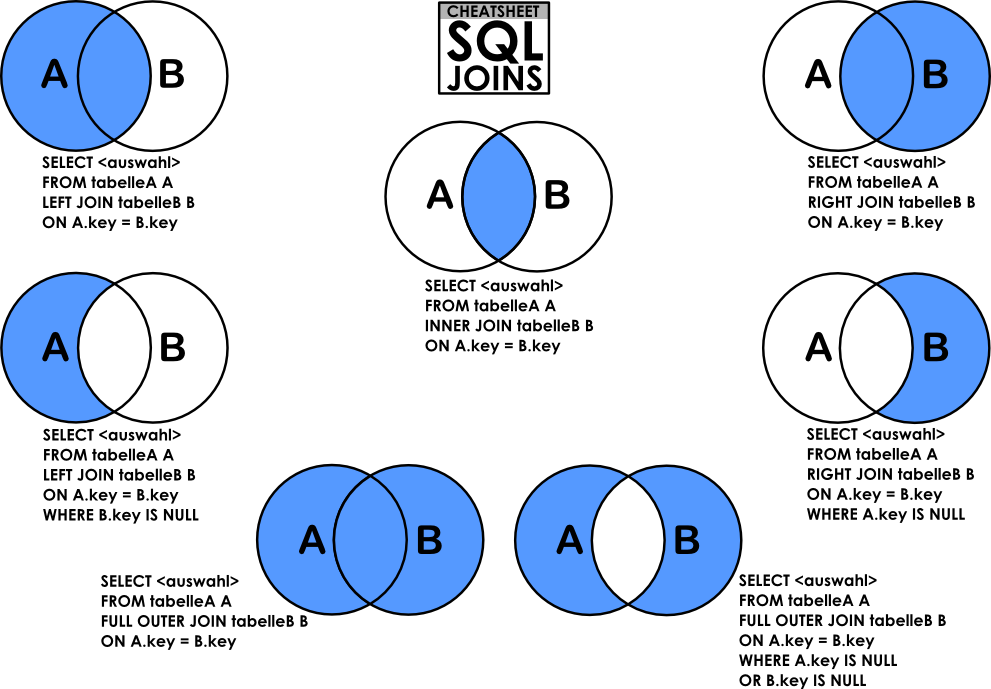
INNER JOIN
SELECT column_name(s)
FROM table_1
JOIN table_2
  ON table_1.column_name = table_2.column_name;
An inner join will combine rows from different tables if the join condition is true.
OUTER JOIN
LEFT JOINRIGHT JOINFULL OUTER JOIN: Returns all rows from both tables, whether there is a match or not.
SELECT column_name(s)
FROM table_1
LEFT JOIN table_2
  ON table_1.column_name = table_2.column_name;
An outer join will combine rows from different tables even if the join condition is not met. Every row in the left table is returned in the result set, and if the join condition is not met, then NULL values are used to fill in the columns from the right table.
CROSS JOIN
The CROSS JOIN clause is used to combine each row from one table with each row from another in the result set. This JOIN is helpful for creating all possible combinations for the records (rows) in two tables.
SELECT shirts.shirt_color, pants.pants_color
FROM shirts
CROSS JOIN pants;
UNION
The UNION clause is used to combine results that appear from multiple SELECT statements and filter duplicates.
SELECT * FROM table1
UNION
SELECT * FROM table2;
SQL has strict rules for appending data:
- Tables must have the same number of columns.
- The columns must have the same data types in the same order as the first table.
WITH
WITH temporary_name AS (
   SELECT *
   FROM table_name)
SELECT *
FROM temporary_name
WHERE column_name operator value;
WITH clause lets you store the result of a query in a temporary table using an alias. You can also define multiple temporary tables using a comma and with one instance of the WITH keyword.
The WITH clause is also known as common table expression (CTE) and subquery factoring.
Other Clauses
AS
SELECT column_name AS 'Alias'
FROM table_name;
AS is a keyword in SQL that allows you to rename a column or table using an alias.
CASE
SELECT column_name,
  CASE
    WHEN condition THEN 'Result_1'
    WHEN condition THEN 'Result_2'
    ELSE 'Result_3'
  END
FROM table_name;
CASE statements are used to create different outputs (usually in the SELECT statement). It is SQL’s way of handling if-then logic.
GROUP BY
SELECT column_name, COUNT(*)
FROM table_name
GROUP BY column_name;
GROUP BY is a clause in SQL that is only used with aggregate functions. It is used in collaboration with the SELECT statement to arrange identical data into groups.
HAVING
SELECT column_name, COUNT(*)
FROM table_name
GROUP BY column_name
HAVING COUNT(*) > value;
HAVING was added to SQL because the WHERE keyword could not be used with aggregate functions.
LIMIT
SELECT column_name(s)
FROM table_name
LIMIT number;
LIMIT is a clause that lets you specify the maximum number of rows the result set will have.
ORDER BY
SELECT column_name
FROM table_name
ORDER BY column_name ASC | DESC;
ORDER BY is a clause that indicates you want to sort the result set by a particular column either alphabetically or numerically.
SELECT DISTINCT
SELECT DISTINCT column_name
FROM table_name;
SELECT DISTINCT specifies that the statement is going to be a query that returns unique values in the specified column(s).
Constraints
PRIMARY KEYcolumns can be used to uniquely identify the row. Attempts to insert a row with an identical value to a row already in the table will result in a constraint violation which will not allow you to insert the new row.UNIQUEcolumns have a different value for every row. This is similar to PRIMARY KEY except a table can have many different UNIQUE columns.NOT NULLcolumns must have a value. Attempts to insert a row without a value for a NOT NULL column will result in a constraint violation and the new row will not be inserted.DEFAULTcolumns take an additional argument that will be the assumed value for an inserted row if the new row does not specify a value for that column.
CREATE TABLE celebs (
    id INTEGER PRIMARY KEY,
    name TEXT UNIQUE,
    grade INTEGER NOT NULL,
    age INTEGER DEFAULT 10
);
Data Types
integer: A whole number between -2147483648 and 2147483647. Postgres also includes alternatives smallint and bigint.real: A floating-point type that has variable-precision with a maximum range of 6 decimals.text: A range of characters of unlimited length.char: A range of characters of fixed length n, an error will be raised for any entries that exceed length n. Entries that are shorter than n will be space-padded.varchar: A range of characters of variable length with a maximum length n. However, unlike char there is no space-padding to extend entries shorter than n.date: A date (without any time value), such as 2022-06-21 (ISO 8601 format) and 6/21/2022.
Column Reference
These queries are equal:
SELECT ROUND(rate), COUNT(name)
FROM movies
GROUP BY ROUND(rate)
ORDER BY ROUND(rate);
SELECT ROUND(rate), COUNT(name)
FROM movies
GROUP BY ROUND(rate)
ORDER BY ROUND(rate);
Reference: https://www.codecademy.com